Flight Tracker-Live Air Radar
- 3.3
- Rating
- 1.00M
- Installs
- Free
- Price

 Analysis by App-foxy
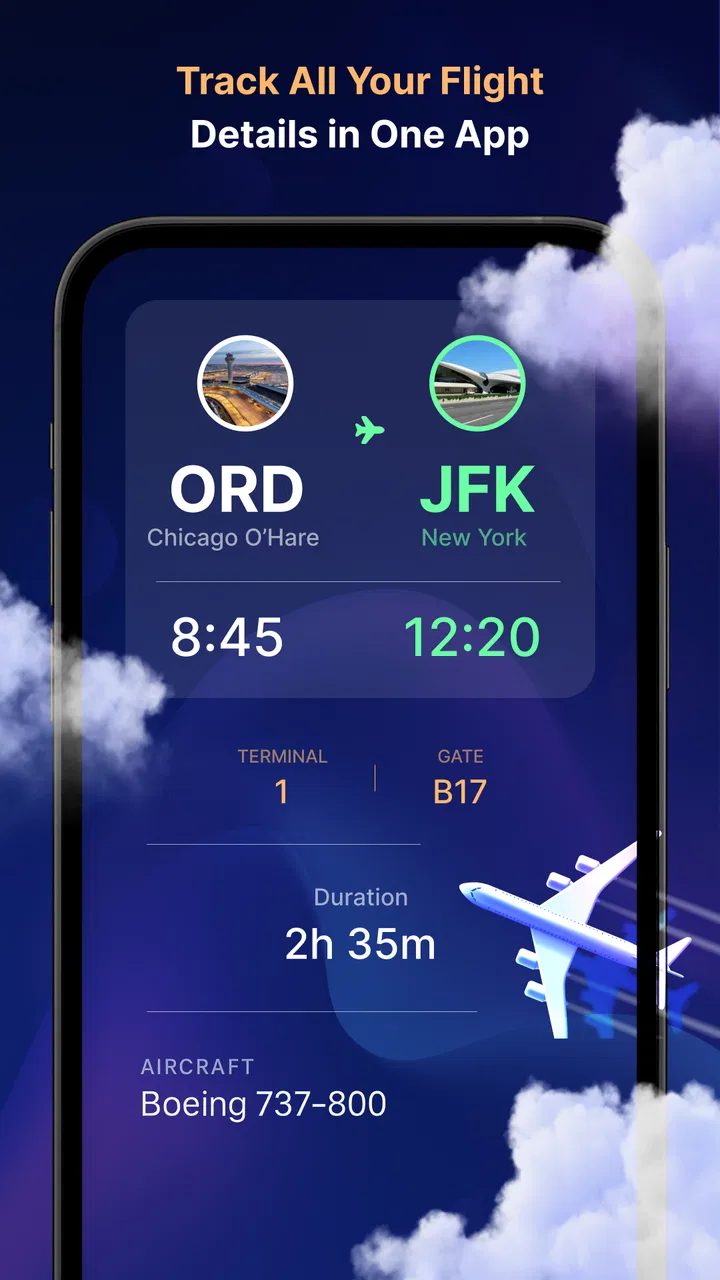
When I first opened Flight Tracker-Live Air Radar, I treated it as a practical travel companion rather than something I would browse every day. That is the right mindset for this app. Its job is to help me follow flights on a live map and check status updates without making me dig through airline pages or airport screens. For a traveler waiting for someone, preparing for a pickup, or trying to understand whether a journey is moving normally, that focused purpose makes sense.
This is a free Travel & Local app from Negroni, available for Everyone and compatible with Android devices running version 5.0 or later. The current version is 3.0, and the app has passed the one-million-install mark. Those figures suggest that it has found a broad audience, although its average rating of 3.2 from around 5,200 ratings tells me to keep expectations realistic. I see it as a useful tracking tool with some rough edges, not as a complete replacement for an airline’s own app.
What to expect before you start tracking
The central experience is straightforward: I use the app to look at flight movement on a live map and to check the latest available status. That combination is more useful than a simple departure board when I want visual context. A status can tell me that a flight is delayed, while a map can help me understand whether it is still approaching, has left the airport area, or is already well into the route.
You May Also Like

 Blood Strike: 2.5 Anniversary
Blood Strike’s Loadouts Turn Every Drop Into a Tactical Gamble
A close look at Blood Strike’s custom loadouts: how fast access to signature weapons reshapes its battle royale rhythm, rewards preparation, and narrows the gap between fights.

 Pandora - Music & Podcasts
Pandora’s Music Is Easy to Start, but Harder to Recover
Pandora’s strength is its low-effort path from a seed to a station. Its weak spot is how much confidence it asks you to place in connection, setup, and quiet recovery.

 8 Ball Pool
 Is Built on Rivalries, Rematches, and Routine
A close look at the rivalries, rematches, shared routines, and unanswered safety questions that turn a quick pool match into a persistent mobile community.

 Samsung Music
’s Quiet Strength Is Playing What You Already Own
Its reach comes less from spectacle than from dependable access to a personal library. That simplicity is both the app’s strongest retention engine and its ceiling.

 AccuWeather: Weather Radar
AccuWeather Review: A Quick, Clear Forecast for Everyday Decisions
For everyday plans, the best forecast is the one you can understand quickly. AccuWeather makes rain timing, radar, and local conditions easy to act on, with a few trade-offs.

 Hill Climb Racing
Why Hill Climb Racing Still Turns Crashes Into One More Run
A tiny car, a bumpy hill and one more upgrade: Hill Climb Racing keeps resurfacing because its simple chaos makes every near-miss feel personal.
More From Our News Desk



For a first-time user, the most important expectation is that this is a flight-focused utility, not a booking service. I would not install it expecting to buy a ticket, manage a reservation, change a seat, or replace an airline account. Its value begins after I already know which flight I want to follow. The app helps me monitor that journey; it does not become the travel agency for the whole trip.
The live map is particularly helpful when another person is traveling. Suppose a family member is flying home and asks me to collect them. Instead of repeatedly asking whether the plane has left, I can use the tracker to get a clearer picture of the journey and check the status before leaving for the airport. That does not eliminate the need to confirm details through official channels, but it can reduce unnecessary messages and guesswork.
I also find the map more useful when timing matters but the exact situation is unclear. A flight may be listed as delayed, yet the delay may change while the aircraft is moving. Looking at the route gives me a more practical sense of progress than staring at a single label. The trade-off is that a map can feel more informative than it really is, so I still treat the displayed status as guidance rather than a promise about baggage, gates, or final arrival arrangements.
The app’s free entry point makes it easy to try for a single trip. There are in-app purchases ranging from $2.99 to $29.99 per item, so I would pay attention to any upgrade screen and decide whether extra convenience is worth it for my own travel habits. Someone who tracks one flight every few months may be perfectly satisfied with the basic experience, while a frequent traveler may judge the paid options differently.
Who will get the most from it
I think it suits three types of people especially well. The first is the airport pickup person who needs a quick way to follow a friend or relative. The second is a traveler who wants a visual overview of a flight instead of relying only on text updates. The third is someone coordinating several people around one journey and wanting a shared reference point for progress.
It is less convincing for users who need airline-specific tools. If I need boarding passes, loyalty information, rebooking, baggage instructions, or direct customer support, I would go to the airline’s app first. The tracker can sit beside that official source, but it should not be the only place I check when a missed connection or a gate change could affect my plans.
Setting it up without making the first trip confusing
My advice is to begin with one flight rather than trying to explore every part of the app at once. Have the flight details ready, open the tracker, and look for the simplest route to the flight status or map view. Starting with a real journey gives the interface a clear purpose and makes it easier to recognize what information is relevant.
A useful preparation step is to write down the flight identifier exactly as it appears in the booking or travel message. Airport names can be similar, and searching by a broad destination can create unnecessary uncertainty. Using the precise flight reference, when the app accepts it, is generally a better workflow than guessing from a list of airports or routes.
I would also check the date carefully. A flight number can be reused on different days, and selecting the wrong day can make a perfectly working tracker appear inaccurate. This is one of the easiest mistakes for a new user to make because the route may look familiar even when the journey being displayed is not the one I intend to follow.
Once I find the relevant flight, I take a moment to compare the route with my booking. I look at the departure and arrival airports and make sure the direction makes sense. This small check is more valuable than immediately trusting a moving icon. It prevents me from monitoring a similarly named service or a flight on another date.
The app runs on older Android versions, which is helpful if I am using a spare phone during travel. Still, the age of the operating system does not guarantee that every device will feel equally smooth. Screen size, connection quality, and the phone’s general condition can affect how comfortable a map is to use. On a small display, I prefer checking the status first and opening the map only when I need the visual detail.
Because this is a live tracking tool, I would install and test it before the day of travel rather than waiting until I am standing in a crowded terminal. That gives me time to learn where the flight search and status information appear. It also lets me decide whether the app’s presentation is clear enough for me before I depend on it during a stressful journey.
The first meaningful success: confirming a real flight
The first useful result is not simply opening a map. It is finding the correct flight and confirming that the displayed route and status match the trip I care about. Once I have done that, I know how the app fits into my routine. I can return to the same flight when I want an update instead of starting from the beginning each time.
For an arriving passenger, I would use the tracker in stages. Before leaving home, I would check the current status. While traveling to the airport, I would use the map or latest update to see whether the flight appears to be progressing as expected. Near the pickup area, I would check again rather than relying on an earlier glance. This workflow is more sensible than driving out immediately after seeing that the aircraft has departed.
For my own flight, I would use it as a second screen alongside the airline’s official information. The tracker is convenient for a quick overview, especially when I want to see movement rather than read a timetable. The airline remains the place I would trust for operational decisions such as boarding instructions or changes that require action.
One non-obvious benefit of this approach is that it separates “Where is the aircraft?” from “What do I need to do?” The live map helps answer the first question. The airline, airport, or booking information usually answers the second. Keeping those roles separate prevents me from mistaking a visually reassuring flight path for confirmation that my gate, baggage arrangement, or connection is secure.
I also like using the tracker for communication. If someone asks me whether a flight is still coming, I can check the current view before replying. I avoid giving an exact promise, though. A visible aircraft position does not tell me how long immigration, baggage collection, or the walk to the meeting point will take. The app helps me plan the airport approach, not predict the precise moment a passenger will appear outside.
Another practical habit is to check the app at decision points instead of refreshing constantly. I might look before leaving, again during the journey, and once more near the airport. That reduces distraction and keeps the information tied to a real choice. Constantly watching a map can create anxiety without improving the plan.
Where new users can get confused
The biggest source of confusion is assuming that “live” means every piece of travel information changes at the same instant. Flight movement and flight status are related, but they are not identical. A map can show progress while the airport experience still involves separate issues such as gate information, security queues, or baggage delays. I would not use the tracker alone to decide when to board or leave the terminal.
Another common mistake is reading the aircraft icon too literally. A map is excellent for orientation, but it is not a substitute for an official operational notice. If the route looks stable while the status carries a delay, I would treat the delay as the important warning. If the map appears slow to change, I would avoid concluding that the flight has stopped without checking another source.
Search mistakes can create a similar problem. Entering only a city name may produce more possibilities than I need, while a small error in a flight identifier can lead me to the wrong result. I recommend checking the airline code, number, date, and airports together. That four-part habit is a simple way to avoid following a different service that happens to share part of the same route.
There is also a difference between tracking a flight and tracking a person. The app follows the journey represented by the flight, not the passenger’s complete airport experience. If a traveler has checked baggage, a connection, special assistance, or a long transfer after landing, the map cannot account for all of that. I would build extra time into any pickup plan.
Notifications and updates deserve a cautious approach as well. I would look at what the app actually displays and how quickly it changes before relying on it for a time-sensitive decision. If I am already at the airport, I would compare it with terminal screens and announcements. Redundancy is not overkill when a missed update could mean a missed boarding opportunity.
The rating of 3.2 is consistent with an app that may be useful but not universally polished. In my view, the likely friction is less about the basic idea and more about how much confidence a user places in the presentation. A person who wants a fast visual reference may accept that trade-off. Someone who expects the precision and service integration of a major airline application may find it limited.
Using it alongside better alternatives
The usual alternatives fall into two groups: official airline apps and airport information tools. The airline app is normally the stronger choice for personal booking details, boarding actions, and customer-service decisions. An airport’s own information channel may be better for terminal-specific notices. I would choose Flight Tracker-Live Air Radar when my main question is the aircraft’s current journey and I want that answer in a map-centered format.
That comparison matters because no single source is ideal for every task. For a simple pickup, the tracker can be quicker than opening a full airline account. For a complicated itinerary, the official airline source is more important. For a gate change, I would prioritize the airport or airline display. For understanding whether a flight is approaching, the map offers a useful perspective that a plain booking screen may not provide.
One of my preferred workflows is to keep the booking confirmation and official airline information available, then use this app as the visual layer. I search for the flight, confirm the route, and use the status as a planning signal. If the information conflicts, I do not spend time trying to decide which screen looks nicer; I check the official source and the airport directly.
That makes the app a good companion rather than a universal authority. It earns its place when it saves me from switching between several pages just to see whether a flight is moving. It loses that advantage when I need a complete travel dashboard with reservation management and direct action buttons.
Costs, privacy-minded habits, and everyday practicality
The app is free to install, but optional purchases are part of the experience. I would not buy anything immediately. First, I would use it on a real flight and decide whether the basic tracking view solves my problem. If an upgrade is presented, I would read exactly what it changes rather than assuming that payment automatically improves the accuracy of every update.
For occasional travelers, the free starting point is a sensible way to judge the app. Frequent users should think in terms of repeated convenience: does the tracker save enough time during regular trips to justify an in-app purchase? That answer depends on personal use, and I would rather make it after seeing the app handle the kind of flights I actually follow.
I also recommend keeping the app’s role narrow when handling travel information. I use the booking confirmation for sensitive reservation details and the tracker for the flight view. That separation makes it easier to notice when I am looking at a general status tool rather than an account connected to my ticket.
A realistic evening-before-travel routine shows where it fits. I can open the tracker to review the flight path and current status, then use the airline’s official channel for check-in or travel instructions. On the morning of departure, I check the tracker again for context, but I still follow the airport’s signs and announcements. This two-source routine is both practical and reassuring for a first-time user.
My recommendation after using it
I would recommend Flight Tracker-Live Air Radar to someone who wants a simple visual way to follow a flight, especially when arranging an airport pickup or checking progress during a journey. The live map gives the experience more context than a static status line, and the free access makes experimentation easy. It is approachable enough for a first trip if I begin with one known flight and verify the details carefully.
I would not recommend making it the sole source for important travel decisions. The app cannot replace official airline instructions, airport announcements, or the information attached to a booking. Its average rating also encourages a measured approach: try it, learn how its updates behave, and keep a backup source available when timing matters.
My practical verdict is to use it as a flight-position companion, not as a complete travel control center. That distinction captures both its strongest quality and its main limitation. If I only need to know whether a flight is progressing and where it roughly stands on the route, it can be genuinely helpful. If I need to manage the entire trip, another option will serve me better.
For a first-time user, the path to success is simple: install it, search for one exact flight, verify the date and airports, compare the result with the booking, and use the map at sensible decision points. Once that routine feels comfortable, the app becomes a handy extra screen for travel days. I would keep it available for pickups and quick checks, while continuing to rely on official sources whenever a status change requires immediate action.
FAQs for Flight Tracker-Live Air Radar
01How accurate is the flight tracking information?
Flight Tracker-Live Air Radar provides real-time updates of flights using data from various reliable sources, including airlines and airports. While generally accurate, occasional discrepancies can occur due to delays in data transmission or changes in flight schedules. Users should cross-reference with official airline information for critical travel decisions.
02Does Flight Tracker-Live Air Radar require an internet connection?
Yes, Flight Tracker-Live Air Radar needs an active internet connection to provide real-time updates and accurate flight tracking information. The app continuously pulls data from online sources to ensure you receive the most up-to-date flight statuses and radar information.
03Can I track multiple flights simultaneously with the app?
Yes, you can track multiple flights simultaneously. The app allows users to set up tracking for various flights, which is particularly useful for frequent travelers or those monitoring the status of friends and family members’ flights. Notifications can be customized for each tracked flight.
04Are there any subscription fees or in-app purchases?
Flight Tracker-Live Air Radar offers a free version with basic features. However, for enhanced capabilities, such as ad-free usage or advanced tracking features, an optional subscription or in-app purchases may be required. Pricing details are available within the app's purchase section.
05Is Flight Tracker-Live Air Radar available for both Android and iOS?
Yes, Flight Tracker-Live Air Radar is available for both Android and iOS platforms. Users can download the app from the Google Play Store for Android devices and the Apple App Store for iOS devices, ensuring compatibility across a wide range of smartphones and tablets.
Pros
- Real-time flight data is highly accurate.
- User-friendly interface for easy navigation.
- Custom alerts for flight status changes.
- Global coverage with detailed maps.
- Minimal battery usage during tracking.
Cons
- Ads can be intrusive at times.
- Limited features in free version.
- Occasional lag in data updates.
- Requires stable internet connection.
- Some advanced features are paid.

Flight Tracker-Live Air Radar
Gallery